DWG files contain valuable intellectual property in architecture, engineering, and manufacturing. Protecting them from unauthorized access, editing, copying, or theft is critical—especially with rising cyber threats and supply chain sharing.
Key Challenges
Autodesk removed built-in password protection for DWG files starting with AutoCAD 2016, as it was deemed insufficient (easily cracked or bypassed). Once opened, files remain fully editable. Modern threats include malware in DWG files and insider risks.
Best Methods to Protect DWG Files
| Method | Description | Pros | Cons | Best For |
|---|---|---|---|---|
| Password-Protected Archives | Zip DWG with tools like 7-Zip, WinZip, or AxCrypt (AES encryption). | Easy, free options available | Protection ends when extracted | Basic transit protection |
| Convert to Secure PDF | Plot/export to PDF and apply DRM (e.g., Locklizard) to block editing, copying, printing, screenshots. | Strong persistent protection | Loses editability (intentional) | Sharing/viewing only |
| Enterprise DRM Tools | Use HALOCAD (integrates Microsoft Information Protection), SealPath, Seclore, or archTIS NC Protect for granular controls (view-only, expiration, revoke access, watermarks). | Persistent protection, auditing | Costly, requires setup | High-security collaboration |
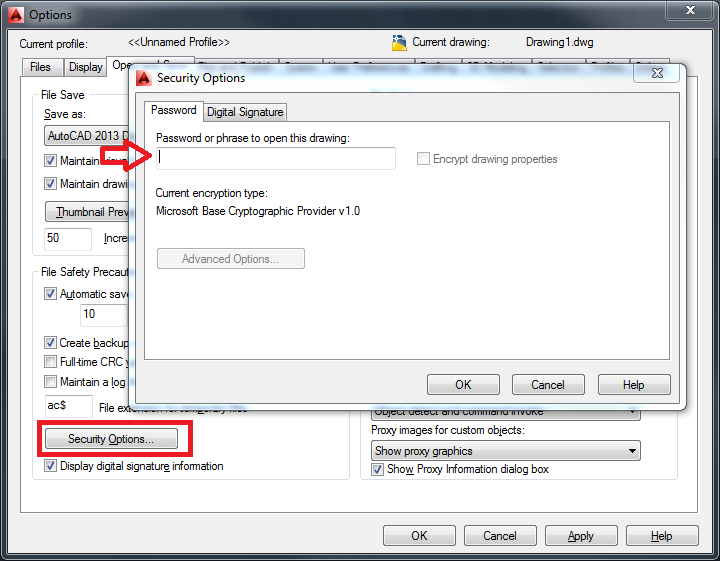
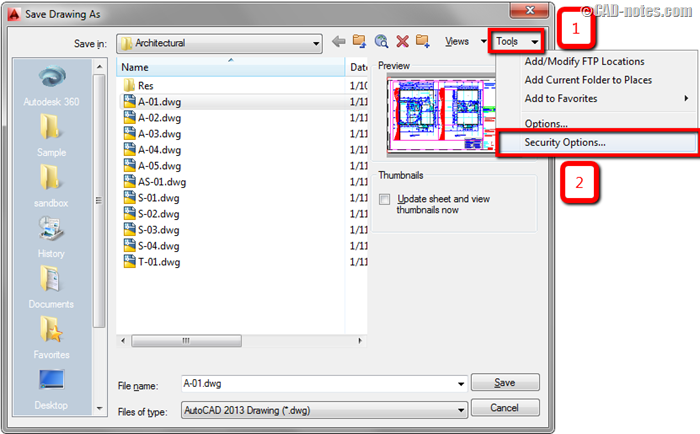
| Digital Signatures | Add signatures via Tools > Options > Open and Save > Security Options (for integrity verification). | Proves authenticity | Doesn't prevent editing | Compliance/proof of origin |
| Secure Sharing Practices | Use Autodesk Docs/cloud collaboration with access controls; NDAs for external shares. | Built-in to Autodesk ecosystem | Relies on user compliance | Internal teams |
| General Best Practices | Keep AutoCAD updated; open only trusted files; use antivirus; enable autosave/backups securely. | Prevents exploits | Ongoing maintenance | All users |

Bottom Line
No single method is foolproof, but layering approaches works best: Use DRM for sensitive external shares, archives for simple transfers, and secure PDFs for view-only distribution. For enterprises handling IP-heavy designs, invest in specialized CAD DRM like HALOCAD or SealPath. Always combine tech with legal protections (NDAs) and train teams on risks.
Protect your designs proactively—lost IP can cost millions. Start assessing your workflow today! 🔒
Comments
Post a Comment